Remove The Ad Box On AIM
This fix has been downloaded 14,612 times.
Notice anything missing in this picture...
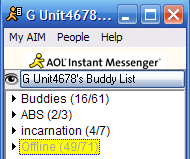
The advertisement box at the top is gone. Follow the two steps below to do the same. It is suggested to have the latest version of AIM(5.9.3861) but this will still work on most versions. AIM Triton will not work with this. You can check what version you have by going to Help, then clicking About AOL(R) Instant Messenger(TM).
Close AIM. Open up the folder C:/Program Files/AIM/ and right click and copy the file AimRes.dll. Paste it into this folder to make a copy, that way you have a backup if this doesn't work.
Download this file and save it to C:/Program Files/AIM/ or wherever AIM is installed. Overwrite the version you already have. Now open AIM. If it loaded and the ad box is gone, then you got it. If AIM doesn't start, delete the AimRes.dll in the folder, and rename the copy you made, AimRes.dll and everything will be back to normal.