Guess - Solve Crossword Puzzles and Hangman
Search for any English word by using a . to take the place of an actual letter. Downloadable and faster versions below.
Windows Installer - guess-1.0-win32.exe (2846k) | Installation Instructions
Linux/BSD Source Install - guess-1.0.tar.gz (521k) | Installation Instructions
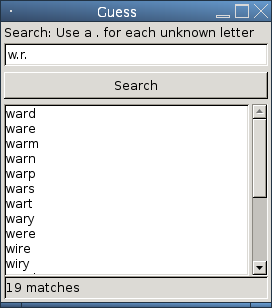
Guess can fill in the blanks on a word and search for all possible matches using a . to take the place of a letter.
Search: p.n
pan
pen
pin
pun
pon
Guess will search through 144,397 words in the English language in order to find all of the matches quickly. Thousands of words can be matched in under a second. All searches are case insensitive as well.
Guess makes solving crossword puzzles or hangman easy. Need a 7 letter word that starts with S and ends in N? Your search is as simple as s.....n
Download guess-1.0-win32.exe (2846k) and run the installer. The installer will create a shortcut on your desktop, along with all the neccessary components such as GTK+ for displaying the graphics. The installation of GTK+ will only include the .dll's necessary for this application to run.
Guess will create an icon on the desktop for quick access. Double click it anytime you want and search away.
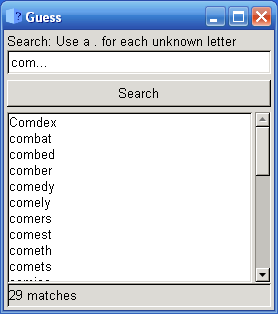
If you would like to replace or add to the list of words, you can do so at C:\Program Files\Guess\wordlist.txt
Download guess-1.0.tar.gz (521k). In order to compile this application, you will need GCC, GTK+ 2, and pkg-config.
Compile by using the following commands in the directory that gpg_gui-current.tar.gz was saved to:
tar xvfz guess-1.0.tar.gz
cd guess-1.0/
./configure
make install clean
Guess will be installed to /usr/local/bin/guess or whatever prefix you specified.
If you would like to replace or add to the list of words, you can do so at /usr/local/share/guess/wordlist.txt or /usr/share/guess/wordlist.txt depending on where you installed it by default.
You can run this front end at any time by creating a shortcut to it on your desktop or running it from the command line as:
guess
The above tool helps you solve quick and cryptic crosswords when you already know some of the letters. But what about when you're approaching a cryptic crossword clue for the first time?
Learn the rules of how cryptic crosswords work, including identifying the type of clue (Anagram, Sounds like, Double meaning, etc.) and then solving them. This guide also includes sample crosswords for you to solve with explanations of how each clue is formed.