GPG GUI - Password Protect Any File
Windows Installer - gpg_gui-win32.exe (2758k) | Installation Instructions
Linux/BSD Source Install - gpg_gui-current.tar.gz (2.7k) | Installation Instructions
GPG GUI has the sole purpose of password protecting individual files so that they can be opened at a later time.
GPG GUI is a front end for the symmetric passphrase feature of GnuPG. This means that any file, of any size, may be encrypted and protected with a password so that no other user can read the contents of the file. Folders cannot be encrypted or decrypted.
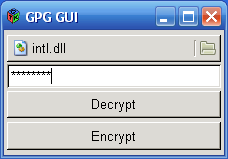
Basic usage for this application would be to get a copy of the file you want to protect, and then opening it with GPG GUI. Once the file is selected, the text entry area would be the place to specify a password the file will be encrypted with. Blank passwords will not work. Selecting "Encrypt" will start the short process that may take time depending on the size of the file. Once the process ends, the directory that the original file is in will have a duplicate protected copy, with the extention .gpg at the end.
I would highly recommend that you check that the protected file will be decrypted by renaming the original and trying out the decrypt action. This will verify that you entered the password correctly. If you delete the original and the password does not work on the encrypted version, you will NOT be able to restore it.
After you have encrypted the file, delete the original if you wish and store the file in a safe place. If you want to share the file with others, you may tell them the password so that they can decrypt the file using GPG GUI or GnuPG.
Download gpg_gui-win32.exe (2758k) and run the installer. The installer will create a shortcut on your desktop, along with all the neccessary components such as GnuPG itself and GTK+ for displaying the graphics. The installation of GnuPG and GTK+ will only include the .dll's and executables necessary for this application to run.
The program can be used two ways on Windows. A file can be opened to be encrypted or decrypted by simply opening the program from the Start Menu or directly accessing it from a shortcut on the deskop.
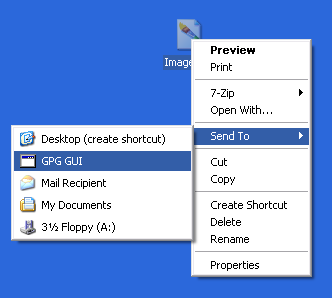
The second method that allows quick usage is the Send To option. Using this method, a file can be selected by right-clicking it and selecting Send To -> GPG GUI. Clicking that will automatically open the file for quick encryption and decryption.
Download gpg_gui-current.tar.gz (2.7k). In order to compile this application, you will need GCC, GnuPG 2, GTK+ 2, and pkg-config.
Compile by using the following commands in the directory that gpg_gui-current.tar.gz was saved to:
tar xvfz gpg_gui-current.tar.gz
cd gpg_gui-current/
make
make install
GPG GUI will be installed to /usr/bin/gpg_gui
You can run this front end at any time by creating a shortcut to it on your desktop or running it from the command line as:
gpg_gui file_that_will_be_opened
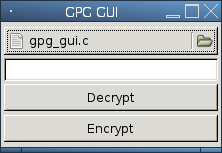
If no file is specified as the first argument, you may then pick the file that requires encrypting or decrypting using the browse method.
In the event you want to transfer an encrypted file to another computer or user who has GnuPG installed, they may decrypt the file by using the following on the command line:
gpg file_to_decrypt.gpg
After this is done, a prompt will appear asking for the correct password. If the password was correctly set, the original will extract so that the user can read the contents.
Likewise, a user with GnuPG can encrypt a file using the following command so that you can decrypt it with the GPG GUI:
gpg -c file_to_decrypt
I LOVE THIS, NOW I CAN HIDE MY PR0N SOES MY MOM CAN'T DELETE IT. ALSO MY CAPTCHA WAS '6669', THE # OF THE BEAST LOL!!
03-25-2008
dose it hava a virus or is it clean
06-07-2008
Ask yourself this question. Would I have spent all the time in the world making this thing, released the source so you can even see what is in it, and then put a virus in it? No, I would have put the virus in it right away, that's seriously a retarded question to ask someone. Besides, if it honestly was a virus, would I have told you? No, I would lie about it.
06-07-2008
So you when you have the file selected, say a picture, you type a password in the box and click encrypt? When I do that it makes a file with the extension "filename.gpg.jpg". IWhen I click "send to" GPG GUI, it opens but when I type the same password and click decrypt, nothing happens and the program closes. Am I doing it right?
Also, can you send the password protected gpg file through an email, along with the setup to the GPG GUI and have the other person encrypt/decrypt it? I don't really understand which one the encrypt/decrypt one is too.
06-19-2008
There is no response when files are decrypted. Basically, here's the procedure.
You encrypt filename.jpg, it becomes filename.jpg.gpg
Now when decrypting, if the file filename.jpg still exists, nothing happens because the file is already there. To really test this, move filename.jpg to another folder for a second, and then try decrypting filename.jpg.gpg. If the correct password is entered, filename.jpg should automatically appear in the directory you tried to decrypt in.
If you find the Send To feature to not work, open the file directly using the program link on either your desktop or your Start -> Programs -> GPG GUI
06-19-2008
Ok thanks man. What language did you write this program with?
p.s. I'm loving your auto typer too. thx
06-19-2008
Ni tool, but i'd like a tick box 'open file' after it's decrypted. It's a pain to click on decrypt then have to find the file, then open it.
08-20-2008
mines just say the file cannot be found
09-21-2008
You have to select the file you want to encrypt/decrypt with the file browser. If you are doing that and a file is still not found, let me know more about it.
09-21-2008
when i try to encrypt/decrypt it just closes down
09-22-2008
A successful encrypt/decrypt will close the application. That's the purpose I needed it for, but I can make an option that the user has to check a box for the program to close after an action.
09-22-2008
nice man...u must be really good at this stuff
09-24-2008
yh it just closes and i dont know what to do next
09-26-2008
If you selected encrypt, a new file should appear in the same folder as the original. If you select decrypt and enter the correct password, the original file will appear in the same folder as the encrypted file.
09-26-2008
ok thanks
10-14-2008
Nice site you made :)
Do you have an auto typer for verification codes yet ?
I mean php codes.
03-16-2009
urm..hi gary..
im having problem with my line...
my line set up a setting so i cant open www.tagged.com..
can u help me?
03-27-2009
There's actually no need to be in this complicated process. I know a software that safely does password protection.
04-12-2009
The password used with the gui does not work in command mode.
As encrypted files are decrypted with the gui using the gpg command mode?
05-15-2009
I am trying to password protect custom puzzles (.exe files) that I design - so they can't be copied and passed around.
Does this software do that - or can you recommend one that does. The puzzles are made up of my propietary omages.
06-05-2009
man my computer must be stuffed i cant even dl this.
06-14-2009
good stuff THANK YOU.
a checkbox to close the app, or a checkbox to open a mini-filebrowser to find the decrypted file would be cool.
TY again.
--B
06-30-2009
Everything on this site is legit as far as I know and this worked great for me like the Runescape auto typer and clicker
11-12-2009
Hi,
i have read about your project GPG GUI, and if i have understand it is compiled against libgcrypt. Now i 'm involved in a project for encrypt/decrypt file using libgcrypt in microsoft windows environment.
Questions:
is your source code available ?
otherwise, is it possible to have some indication about encrypt/decrypt file with libgcrypt?
Thank you
12-17-2009
Hello, I think this is a very useful and well-made little program. I just have one question, though. If I put GPG GUI in a folder, can I encrypt the folder with GPG GUI even though GPG GUI is inside the folder? And can I decrypt it successfully?
12-26-2009
NICE
01-27-2010
WHahahaha.
Someone so good in scripting, jet he fails to make his download link work for a windows 7 64 bit using internet explorer!
Bye the way, i made my own autotyper. It a dictionarry attacker. It has every posseble feature in it. however the bruteforce main code line (the one saying to use random combinations of letters and numbers and one of eatche combination seems to fail. I can use some help whit that part. Don't say you don't like the illigal part. Using it is illigal, making is legal. Like your autotalker for runescape.
01-31-2010
Thanks Gary! I have written a bit of software as a hobbyist and then released it to a public that was glad to have it but would never have paid for it... This is just to let you know you are appreciated - good stuff.
02-28-2010
i need a 15milloins (15000000) some good stuff
i hope you helping me
and thank you for helping
03-22-2010
gary, you are like god on earth, THNAK YOU!
03-26-2010
this sucks hard
04-04-2010
how do i hack a runescape account?
04-04-2010
Is there a way to protect entire folders with this program?
If so, <3.
04-19-2010
Mine lets me encrypt a file but when i open it you don't need to type in password, did i do something wrong?
05-27-2010
I love all you project man... Great ideas... Can you send me project? I will do great graphic design for this and send you... Send on email: fondza@yahoo.com
And leave email adress so i can send you designed project...
Tnx!
06-16-2010
how do i do pass encrypt or decypt its says not found help plz?
08-24-2010
Garys Hood Bot
Subscribe